Create Credentials
Users can create Credentials (username/password pair) for Kafka Service’s connection configuration using the SASL/SCRAM-SHA-256 authentication method. Step 1 : From the menu, navigate to Application > Credentials. Click Create Step 2 : Enter the necessary information"
- Username (required)
- Password (required)
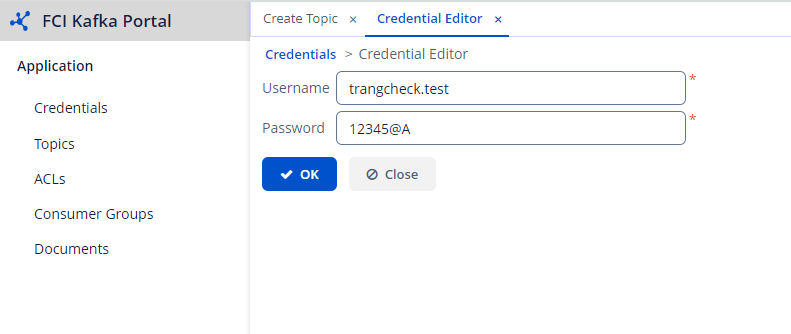 Note : Initially, the system will auto-generate a password. You can reset the password if needed.
Step 3 : Click OK to create the credential.
Note : The topic name must follow the format [prefix].[credential name]
Note : Initially, the system will auto-generate a password. You can reset the password if needed.
Step 3 : Click OK to create the credential.
Note : The topic name must follow the format [prefix].[credential name]