Shared script for code & secret scans
Guideline: Tích hợp Scanning API của FSP Core Service vào CI/CD Pipelines
Hướng dẫn này sẽ hướng dẫn bạn cách tích hợp các endpoint quét dịch vụ lõi FSP vào quy trình CI/CD của mình, cho phép tự động quét mã nguồn, quét bí mật và quét bảo mật hình ảnh container trên mỗi lần thay đổi.
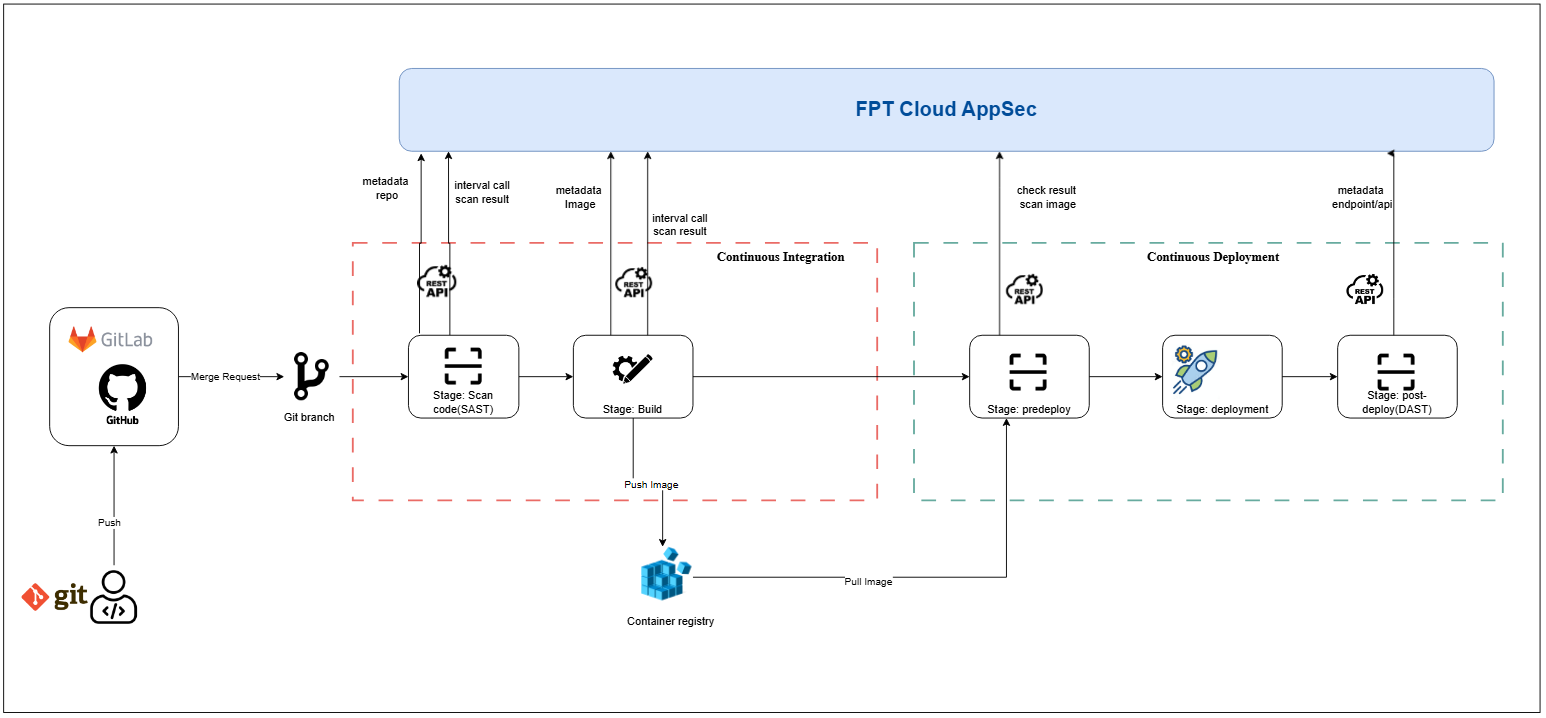
1. Tổng quan
Tự động hóa các bước quét bảo mật trong pipeline CI/CD giúp phát hiện lỗ hổng sớm. Hướng dẫn này bao gồm:
- Yêu cầu chuẩn bị
- Cách thiết lập xác thực
- Các bước tích hợp pipeline cho scan code, scan secret, và scan image
- Cấu hình mẫu (GitLab CI, Jenkins)
2. Yêu cầu chuẩn bị
- Tài khoản FSP Core Service đang hoạt động, với Orgid và access_key hợp lệ.
- Truy cập được các endpoint API (ví dụ: /integration/scan-code, /integration/scan-secret, /integration/scan-image và các endpoint lấy kết quả tương ứng).
- Runner hoặc agent CI/CD có thể kết nối mạng tới API FSP Core Service.
- Môi trường shell Unix-like (bash, sh) để viết script gọi HTTP.
3. Đặc tả API
3.1. Tích hợp scan code
3.1.1. Scan toàn bộ mã nguồn
POST /api/v1/xplat/fsp-service/core-service/integration/scan-code
Khởi tạo quét mã nguồn cho một kho lưu trữ và commit cụ thể thuộc nhóm FSEC.
Yêu cầu
Headers
| Tên | Loại | Bắt buộc | Mô tả |
|---|---|---|---|
| Orgid | string | Không | ID tổ chức để xác thực |
| Body | |||
| Content-Type: application/json | |||
| Tên | Loại | Bắt buộc | Mô tả |
| --- | --- | --- | --- |
| team_code | string | Có | Mã của nhóm FSEC, cách lấy team_code tại đây |
| git_repo_url | string | Có | URL kho lưu trữ Git (ví dụ: GitHub hoặc GitLab) |
| access_key | string | Có | Khóa truy cập do FSEC cấp để truy cập kho lưu trữ, lấy access_key tại màn hình Integration detailtại đây, tương tự với các loại tích hợp khác |
| branch | string | Có | Tên nhánh cần quét |
| commit | string | Không | SHA của commit trên nhánh cần quét |
| Ví dụ |
CopyPOST /api/v1/xplat/fsp-service/core-service/integration/scan-code HTTP/1.1
Host: api.yourdomain.com
Orgid: 123e4567-e89b-12d3-a456-426614174000
Accept: application/json
Content-Type: application/json

{
  "team_code": "FSEC_TEAM_001",
  "git_repo_url": "https://github.com/example/repo.git",
  "access_key": "abcd1234",
  "branch": "main",
}
Phản hồi
- 200 - Successful Response
Copy{
  "data": {
    "errorCode": "F-000",
    "errorMessage": "",
    "data": {
      "request_code": "",
      "request_time": "2025-03-25 13:34:11"
    }
  }
}
- 422 - Validation Error
Copy{
  "detail": [
    {
      "loc": ["string", 0],
      "msg": "string",
      "type": "string"
    }
  ]
}
3.1.2. Scan theo commit
POST /api/v1/xplat/fsp-service/core-service/integration/scan-code?scan-mode=commit
Khởi tạo quét mã nguồn cho một kho lưu trữ và commit cụ thể thuộc nhóm FSEC.
Yêu cầu
Headers
| Tên | Loại | Bắt buộc | Mô tả |
|---|---|---|---|
| Orgid | string | Không | ID tổ chức để xác thực |
| Body | |||
| Content-Type: application/json | |||
| Tên | Loại | Bắt buộc | Mô tả |
| --- | --- | --- | --- |
| team_code | string | Có | Mã của nhóm FSEC, cách lấy team_code tại đây |
| git_repo_url | string | Có | URL kho lưu trữ Git (ví dụ: GitHub hoặc GitLab) |
| access_key | string | Có | Khóa truy cập do FSEC cấp để truy cập kho lưu trữ, cách lấy access_key của GitLab server tại đây, tương tự với các loại tích hợp khác |
| branch | string | Có | Tên nhánh cần quét |
| commit | string | Có | SHA của commit trên nhánh cần quét |
| Ví dụ |
CopyPOST /api/v1/xplat/fsp-service/core-service/integration/scan-code?scan-mode=commit HTTP/1.1
Host: api.yourdomain.com
Orgid: 123e4567-e89b-12d3-a456-426614174000
Accept: application/json
Content-Type: application/json

{
  "team_code": "FSEC_TEAM_001",
  "git_repo_url": "https://github.com/example/repo.git",
  "access_key": "abcd1234",
  "branch": "main",
  "commit": "a1b2c3d4e5f6g7h8i9j0"
}
Phản hồi
- 200 - Successful Response
Copy{
  "data": {
    "errorCode": "F-000",
    "errorMessage": "",
    "data": {
      "request_code": "",
      "request_time": "2025-03-25 13:34:11"
    }
  }
}
- 422 - Validation Error
Copy{
  "detail": [
    {
      "loc": ["string", 0],
      "msg": "string",
      "type": "string"
    }
  ]
}
3.2. Tích hợp scan secret
3.2.1. Scan toàn bộ mã nguồn
POST /api/v1/xplat/fsp-service/core-service/integration/scan-secret Khởi tạo quét secret cho một kho lưu trữ và commit cụ thể thuộc nhóm FSEC.
Yêu cầu
Headers
| Tên | Loại | Bắt buộc | Mô tả |
|---|---|---|---|
| Orgid | string | Không | ID tổ chức để xác thực |
| Body | |||
| Content-Type: application/json | |||
| Tên | Loại | Bắt buộc | Mô tả |
| --- | --- | --- | --- |
| team_code | string | Có | Mã của nhóm FSEC, cách lấy team_code tại đây |
| git_repo_url | string | Có | URL kho lưu trữ Git (ví dụ: GitHub hoặc GitLab) |
| access_key | string | Có | Khóa truy cập do FSEC cấp để truy cập kho lưu trữ, cách lấy access_key của GitLab server tại đây, tương tự với các loại tích hợp khác |
| branch | string | Có | Tên nhánh cần quét |
| commit | string | Không | SHA của commit trên nhánh cần quét |
| Ví dụ |
CopyPOST /api/v1/xplat/fsp-service/core-service/integration/scan-secret HTTP/1.1
Host: api.yourdomain.com
Orgid: 123e4567-e89b-12d3-a456-426614174000
Accept: application/json
Content-Type: application/json

{
  "team_code": "FSEC_TEAM_001",
  "git_repo_url": "https://github.com/example/repo.git",
  "access_key": "abcd1234",
  "branch": "main",
}
Phản hồi
- 200 - Successful Response
Copy{
  "data": {
    "errorCode": "F-000",
    "errorMessage": "",
    "data": {
      "request_code": "",
      "request_time": "2025-03-25 13:34:11"
    }
  }
}
- 422 - Validation Error
Copy{
  "detail": [
    {
      "loc": ["string", 0],
      "msg": "string",
      "type": "string"
    }
  ]
}
3.2.2. Scan theo commit
POST /api/v1/xplat/fsp-service/core-service/integration/scan-secret?scan-mode=commit Khởi tạo quét secret cho một kho lưu trữ và commit cụ thể thuộc nhóm FSEC.
Yêu cầu
Headers
| Tên | Loại | Bắt buộc | Mô tả |
|---|---|---|---|
| Orgid | string | Không | ID tổ chức để xác thực |
| Body | |||
| Content-Type: application/json | |||
| Tên | Loại | Bắt buộc | Mô tả |
| --- | --- | --- | --- |
| team_code | string | Có | Mã của nhóm FSEC, cách lấy team_code tại đây |
| git_repo_url | string | Có | URL kho lưu trữ Git (ví dụ: GitHub hoặc GitLab) |
| access_key | string | Có | Khóa truy cập do FSEC cấp để truy cập kho lưu trữ, cách lấy access_key của GitLab server tại đây, tương tự với các loại tích hợp khác |
| branch | string | Có | Tên nhánh cần quét |
| commit | string | Có | SHA của commit trên nhánh cần quét |
| Ví dụ |
CopyPOST /api/v1/xplat/fsp-service/core-service/integration/scan-secret?scan-mode=commit HTTP/1.1
Host: api.yourdomain.com
Orgid: 123e4567-e89b-12d3-a456-426614174000
Accept: application/json
Content-Type: application/json

{
  "team_code": "FSEC_TEAM_001",
  "git_repo_url": "https://github.com/example/repo.git",
  "access_key": "abcd1234",
  "branch": "main",
  "commit": "a1b2c3d4e5f6g7h8i9j0"
}
Phản hồi
- 200 - Successful Response
Copy{
  "data": {
    "errorCode": "F-000",
    "errorMessage": "",
    "data": {
      "request_code": "",
      "request_time": "2025-03-25 13:34:11"
    }
  }
}
- 422 - Validation Error
Copy{
  "detail": [
    {
      "loc": ["string", 0],
      "msg": "string",
      "type": "string"
    }
  ]
}
3.3. Tích hợp scan image
POST /api/v1/xplat/fsp-service/core-service/integration/scan-image Khởi tạo quét image cho một kho lưu trữ và commit cụ thể thuộc nhóm FSEC.
Yêu cầu
Headers
| Tên | Loại | Bắt buộc | Mô tả |
|---|---|---|---|
| Orgid | string | Không | ID tổ chức để xác thực |
| Body | |||
| Content-Type: application/json | |||
| Tên | Loại | Bắt buộc | Mô tả |
| --- | --- | --- | --- |
| team_code | string | Có | Mã của nhóm FSEC, cách lấy team_code tại đây |
| access_key | string | Có | Khóa truy cập do FSEC cấp cho registry image, cách lấy access_key của GitLab server tại đây, tương tự với các loại tích hợp khác |
| image_url | string | Có | Đường dẫn registry và tag của image (ví dụ: repo:tag) |
| Ví dụ |
CopyPOST /api/v1/xplat/fsp-service/core-service/integration/scan-image HTTP/1.1
Host: api.yourdomain.com
Orgid: 123e4567-e89b-12d3-a456-426614174000
Accept: application/json
Content-Type: application/json

{
  "team_code": "FSEC_TEAM_001",
  "access_key": "abcd1234",
  "image_url": "registry.example.com/myapp:latest"
}
Phản hồi
- 200 - Successful Response
Copy{
  "data": {
    "errorCode": "F-000",
    "errorMessage": "",
    "data": {
      "request_code": "",
      "request_time": "2025-03-25 13:34:11"
    }
  }
}
- 422 - Validation Error
Copy{
  "detail": [
    {
      "loc": ["string", 0],
      "msg": "string",
      "type": "string"
    }
  ]
}
3.4. Tích hợp lấy kết quả scan code
POST /api/v1/xplat/fsp-service/core-service/integration/get-scan-code-result Lấy kết quả của một lần quét mã nguồn đã khởi tạo trước đó bằng request_code.
Yêu cầu
Headers
| Tên | Loại | Bắt buộc | Mô tả |
|---|---|---|---|
| Orgid | string | Không | ID tổ chức để xác thực |
| Body | |||
| Content-Type: application/json | |||
| Tên | Loại | Bắt buộc | Mô tả |
| --- | --- | --- | --- |
| request_code | string | Có | Mã yêu cầu trả về từ /scan-code |
| access_key | string | Có | Khóa truy cập do FSEC cấp, cách lấy access_key của GitLab server tại đây, tương tự với các loại tích hợp khác |
| Ví dụ |
CopyPOST /api/v1/xplat/fsp-service/core-service/integration/get-scan-code-result HTTP/1.1
Host: api.yourdomain.com
Orgid: 123e4567-e89b-12d3-a456-426614174000
Accept: application/json
Content-Type: application/json

{
  "request_code": "RSC-123456",
  "access_key": "abcd1234"
}
Phản hồi
- 200 - Successful Response
Copy{
    "errorCode": "F-000",
    "errorMessage": "",
    "data": {
        "request_code": "RSC-123456",
        "scan_status": "FINISHED",
        "scan_result_status": "SUCCESS",
        "scan_result": {
            "C": 0,
            "H": 0,
            "L": 0,
            "M": 4
        },
        "result_details": {
            "scanCode": {
                "M": 4,
                "L": 0,
                "H": 0,
                "C": 0
            }
        },
        "finish_time": "2025-08-18 04:32:30.137421",
        "quatity_gate": null
    }
}
- 422 - Validation Error
Copy{
  "detail": [
    {
      "loc": ["string", 0],
      "msg": "string",
      "type": "string"
    }
  ]
}
3.5. Tích hợp lấy kết quả scan secret
POST /api/v1/xplat/fsp-service/core-service/integration/get-scan-secret-result Lấy kết quả của một lần quét secret đã khởi tạo trước đó bằng request_code.
Yêu cầu
Headers
| Tên | Loại | Bắt buộc | Mô tả |
|---|---|---|---|
| Orgid | string | Không | ID tổ chức để xác thực |
| Body | |||
| Content-Type: application/json | |||
| Tên | Loại | Bắt buộc | Mô tả |
| --- | --- | --- | --- |
| request_code | string | Có | Mã yêu cầu trả về từ /scan-secret |
| access_key | string | Có | Khóa truy cập do FSEC cấp, cách lấy access_key của GitLab server tại đây, tương tự với các loại tích hợp khác |
| Ví dụ |
CopyPOST /api/v1/xplat/fsp-service/core-service/integration/get-scan-secret-result HTTP/1.1
Host: api.yourdomain.com
Orgid: 123e4567-e89b-12d3-a456-426614174000
Accept: application/json
Content-Type: application/json

{
  "request_code": "RSC-123456",
  "access_key": "abcd1234"
}
Phản hồi
- 200 - Successful Response
Copy{
    "errorCode": "F-000",
    "errorMessage": "",
    "data": {
        "request_code": "RSC-123456",
        "scan_status": "FINISHED",
        "scan_result_status": "SUCCESS",
        "scan_result": {
            "C": 0,
            "H": 0,
            "L": 0,
            "M": 4
        },
        "result_details": {
            "scanCode": {
                "M": 4,
                "L": 0,
                "H": 0,
                "C": 0
            }
        },
        "finish_time": "2025-08-18 04:32:30.137421",
        "quatity_gate": null
    }
}
- 422 - Validation Error
Copy{
  "detail": [
    {
      "loc": ["string", 0],
      "msg": "string",
      "type": "string"
    }
  ]
}
3.6. Tích hợp lấy kết quả scan image
POST /api/v1/xplat/fsp-service/core-service/integration/get-scan-image-result Lấy kết quả của một lần quét image đã khởi tạo trước đó bằng request_code.
Yêu cầu
Headers
| Tên | Loại | Bắt buộc | Mô tả |
|---|---|---|---|
| Orgid | string | Không | ID tổ chức để xác thực |
| Body | |||
| Content-Type: application/json | |||
| Tên | Loại | Bắt buộc | Mô tả |
| --- | --- | --- | --- |
| request_code | string | Có | Mã yêu cầu trả về từ /scan-image |
| access_key | string | Có | Khóa truy cập do FSEC cấp, cách lấy access_key của GitLab server tại đây, tương tự với các loại tích hợp khác |
| Ví dụ |
CopyPOST /api/v1/xplat/fsp-service/core-service/integration/get-scan-image-result HTTP/1.1
Host: api.yourdomain.com
Orgid: 123e4567-e89b-12d3-a456-426614174000
Accept: application/json
Content-Type: application/json

{
  "request_code": "RSC-123456",
  "access_key": "abcd1234"
}
Phản hồi
- 200 - Successful Response
Copy{
    "errorCode": "F-000",
    "errorMessage": "",
    "data": {
        "request_code": "RSC-123456",
        "scan_status": "FINISHED",
        "scan_result_status": "SUCCESS",
        "scan_result": {
            "C": 0,
            "H": 0,
            "L": 0,
            "M": 4
        },
        "result_details": {
            "scanCode": {
                "M": 4,
                "L": 0,
                "H": 0,
                "C": 0
            }
        },
        "finish_time": "2025-08-18 04:32:30.137421",
        "quatity_gate": null
    }
}
- 422 - Validation Error
Copy{
  "detail": [
    {
      "loc": ["string", 0],
      "msg": "string",
      "type": "string"
    }
  ]
}
4. Pipeline flow
4.1. Giai đoạn scan code (sau bước checkout source)
- Kích hoạt scan :
-
* Scan toàn bộ source code: Gọi `POST /api/v1/xplat/fsp-service/core-service/integration/scan-code` với thông tin chi tiết về repository. -
* Scan thay đổi theo commit: Gọi `POST /api/v1/xplat/fsp-service/core-service/integration/scan-code?scan-mode=commit` với thông tin chi tiết về repository. - Lấy kết quả : Gọi
POST /api/v1/xplat/fsp-service/core-service/integration/get-scan-code-resultvà lặp lại đến khi scan_result_status = SUCCESS. - Đánh giá pass/fail : Dựa trên kết quả thuộc trường scan_result hoặc các ngưỡng chất lượng (quality gate) riêng.
4.2. Giai đoạn scan secret (sau bước checkout source)
- Kích hoạt scan : Gọi
POST /api/v1/xplat/fsp-service/core-service/integration/scan-secretvới payload giống bước scan code. - Lấy kết quả : Gọi
POST /api/v1/xplat/fsp-service/core-service/integration/get-scan-secret-resultvà lặp lại đến khi scan_result_status = SUCCESS. - Đánh giá pass/fail : Dựa trên kết quả thuộc trường scan_result hoặc các ngưỡng chất lượng (quality gate) riêng.
4.3. Giai đoạn scan image (sau bước build)
- Kích hoạt scan : Gọi
POST /api/v1/xplat/fsp-service/core-service/integration/scan-imagevới tag của image. - Lấy kết quả : Gọi
POST /api/v1/xplat/fsp-service/core-service/integration/get-scan-image-resultvà lặp lại đến khi scan_result_status = SUCCESS. - Đánh giá pass/fail : Dựa trên kết quả thuộc trường scan_result hoặc các ngưỡng chất lượng (quality gate) riêng.
5. Cấu hình mẫu
5.1. GitLab CI
Copyvariables:
  ORGID: "$FSP_ORGID"
  ACCESS_KEY: "$FSP_ACCESS_KEY"
  API_URL: "https://api.yourdomain.com/api/v1/xplat/fsp-service/core-service"
  TEAM_CODE: "FSEC_TEAM_001"

stages:
  - code-scan
  - secret-scan
  - build
  - image-scan

.scan-stage: &scan-stage
  image: alpine:latest
  before_script:
    - apk add --no-cache curl jq
  script:
    - echo "Trigger scan"
    - RESPONSE=$(curl -s -X POST "$API_URL/integration/${ENDPOINT}" \
        -H "Orgid: $ORGID" \
        -H "access_key: $ACCESS_KEY" \
        -H "Content-Type: application/json" \
        -d "{\"team_code\":\"$TEAM_CODE\",\"git_repo_url\":\"$CI_PROJECT_URL.git\",\"branch\":\"$CI_COMMIT_REF_NAME\",\"commit\":\"$CI_COMMIT_SHA\"}")
    - CODE=$(echo "$RESPONSE" | jq -r '.data.data.request_code')
    - |
      echo "Polling for scan result..."
      until [ "$(curl -s -X POST "$API_URL/integration/$RESULT_ENDPOINT" \
            -H "Orgid: $ORGID" -H "access_key: $ACCESS_KEY" \
            -H "Content-Type: application/json" \
            -d "{\"request_code\":\"$CODE\",\"access_key\":\"$ACCESS_KEY\"}" \
        | jq -r '.data.data.status')" = "COMPLETED" ]; do
        sleep 10
      done
    - ISSUES=$(curl -s -X POST "$API_URL/integration/$RESULT_ENDPOINT" \
        -H "Orgid: $ORGID" -H "access_key: $ACCESS_KEY" \
        -H "Content-Type: application/json" \
        -d "{\"request_code\":\"$CODE\",\"access_key\":\"$ACCESS_KEY\"}" \
        | jq '.data.data.issues_found')
    - if [ "$ISSUES" -gt 0 ]; then echo "Found $ISSUES issues in $ENDPOINT"; exit 1; fi

code-scan:
  stage: code-scan
  variables:
    ENDPOINT: "scan-code"
    RESULT_ENDPOINT: "get-scan-code-result"
  <<: *scan-stage

secret-scan:
  stage: secret-scan
  variables:
    ENDPOINT: "scan-secret"
    RESULT_ENDPOINT: "get-scan-secret-result"
  <<: *scan-stage

build:
  stage: build
  script:
    - docker build -t myapp:$CI_COMMIT_SHA .

image-scan:
  stage: image-scan
  script:
    - echo "Trigger image scan"
    - RESPONSE=$(curl -s -X POST "$API_URL/integration/scan-image" \
        -H "Orgid: $ORGID" \
        -H "access_key: $ACCESS_KEY" \
        -H "Content-Type: application/json" \
        -d "{\"team_code\":\"$TEAM_CODE\",\"access_key\":\"$ACCESS_KEY\",\"image_url\":\"registry.example.com/myapp:$CI_COMMIT_SHA\"}")
    - CODE=$(echo "$RESPONSE" | jq -r '.data.data.request_code')
    - |
      echo "Polling for image scan result..."
      until [ "$(curl -s -X POST "$API_URL/integration/get-scan-image-result" \
            -H "Orgid: $ORGID" -H "access_key: $ACCESS_KEY" \
            -H "Content-Type: application/json" \
            -d "{\"request_code\":\"$CODE\",\"access_key\":\"$ACCESS_KEY\"}" \
        | jq -r '.data.data.scan_status')" = "COMPLETED" ]; do
        sleep 10
      done
    - HIGH=$(curl -s -X POST "$API_URL/integration/get-scan-image-result" \
        -H "Orgid: $ORGID" -H "access_key: $ACCESS_KEY" \
        -H "Content-Type: application/json" \
        -d "{\"request_code\":\"$CODE\",\"access_key\":\"$ACCESS_KEY\"}" \
        | jq '.data.data.scan_result.H')
    - if [ "$HIGH" -gt 0 ]; then echo "High severity issues found"; exit 1; fi
5.2. Jenkins Pipeline
Copypipeline {
  agent any
  environment {
    ORGID = credentials('FSP_ORGID')
    ACCESS_KEY = credentials('FSP_ACCESS_KEY')
    API_URL = 'https://api.yourdomain.com/api/v1/xplat/fsp-service/core-service'
  }
  stages {
    stage('Code Scan') {
      steps {
        script {
          def payload = [team_code: 'FSEC_TEAM_001', git_repo_url: env.GIT_URL, branch: env.BRANCH_NAME, commit: env.GIT_COMMIT]
          def response = httpRequest acceptType: 'APPLICATION_JSON', contentType: 'APPLICATION_JSON', httpMode: 'POST', requestBody: groovy.json.JsonOutput.toJson(payload), url: "${API_URL}/integration/scan-code", customHeaders: [[name:'Orgid', value:ORGID], [name:'access_key', value:ACCESS_KEY]]
          def code = readJSON(text: response.content).data.data.request_code
          timeout(time: 5, unit: 'MINUTES') {
            waitUntil {
              def result = httpRequest acceptType: 'APPLICATION_JSON', contentType: 'APPLICATION_JSON', httpMode: 'POST', requestBody: groovy.json.JsonOutput.toJson([request_code: code, access_key: ACCESS_KEY]), url: "${API_URL}/integration/get-scan-code-result", customHeaders: [[name:'Orgid', value:ORGID], [name:'access_key', value:ACCESS_KEY]]
              return readJSON(text: result.content).data.data.status == 'COMPLETED'
            }
          }
          def issues = readJSON(text: result.content).data.data.issues_found
          if (issues > 0) { error "Found ${issues} code issues" }
        }
      }
    }
    stage('Secret Scan') {
      steps {
        script {
          def payload = [team_code: 'FSEC_TEAM_001', git_repo_url: env.GIT_URL, branch: env.BRANCH_NAME, commit: env.GIT_COMMIT]
          def response = httpRequest acceptType: 'APPLICATION_JSON', contentType: 'APPLICATION_JSON', httpMode: 'POST', requestBody: groovy.json.JsonOutput.toJson(payload), url: "${API_URL}/integration/scan-secret", custom